Voice-Guided Blood Pressure Monitors: Prompts, Quiet Use and Privacy
Some upper-arm monitors offer spoken prompts or readings. Understand what a voice feature changes, how to check sound controls and why private measurement records still matter.
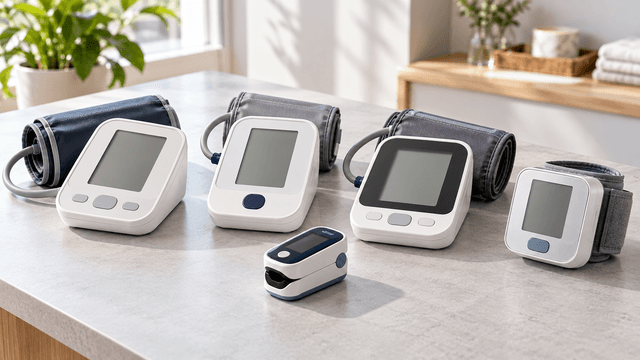
Home blood pressure monitors have become an important part of everyday health management for many households. They allow people to record blood pressure readings outside a clinic and share the results with healthcare professionals when necessary.
Some digital monitors now include an additional feature: spoken instructions and voice announcements.
A voice-guided blood pressure monitor may announce measurement results, provide instructions before use, or alert users to certain device-related conditions.
These features can be convenient, particularly for people who find small digital screens difficult to read.
However, spoken announcements also introduce practical considerations.
A monitor that reads results aloud may disturb a quiet room, disclose personal health information to nearby people, or create confusion if users assume that the voice feature makes the device more accurate.
The most important principle is that voice guidance should make blood pressure monitoring easier to use without replacing correct measurement technique, medical advice, or basic privacy precautions.
This guide explains how talking blood pressure monitors work, how to use voice settings, how to take measurements quietly, and how to protect personal readings when multiple people share a device.
What Is a Voice-Guided Blood Pressure Monitor?
A voice-guided blood pressure monitor is an electronic blood pressure measuring device that includes an audio announcement or instruction feature.
Many voice-enabled models use an automatic upper-arm cuff, although voice assistance is also found in some other monitor designs.
The device measures blood pressure using its built-in measurement system.
The voice function then provides information through a speaker.
Depending on the model, it may announce:
- Instructions before measurement
- Reminders to remain still
- Measurement progress
- Systolic blood pressure
- Diastolic blood pressure
- Pulse rate
- Certain error messages
- Other supported device notifications
Not every talking monitor provides all these features.
Some devices only announce the final reading.
Others offer a more extensive sequence of spoken prompts.
The available features depend on the manufacturer and model.
What Does Voice Guidance Actually Change?
Voice guidance changes how the device communicates information.
It does not automatically change how blood pressure is measured.
For example, a talking upper-arm monitor and a non-talking upper-arm monitor may use similar measurement technology.
The important difference may simply be that one announces the results through a speaker.
A voice feature does not, by itself, establish that a monitor is more accurate, medically advanced, or suitable for every user.
How Does a Talking Blood Pressure Monitor Work?
Most automatic upper-arm blood pressure monitors use an inflatable cuff.
The cuff is wrapped around the upper arm and connected to the monitor.
During measurement, the cuff inflates and then releases pressure.
Many automatic monitors use a method called oscillometry, which analyzes pressure fluctuations associated with blood flow.
The device uses its internal algorithms to estimate blood pressure.
After the process is completed, it displays the result.
On a voice-enabled model, the speaker may also announce the reading.
Systolic Blood Pressure
Systolic pressure is the higher number.
It represents arterial pressure associated with the heart’s contraction.
Diastolic Blood Pressure
Diastolic pressure is the lower number.
It represents arterial pressure during the relaxation phase between heartbeats.
Pulse Rate
Many blood pressure monitors also display an estimated pulse rate.
This is usually shown as beats per minute.
However, a pulse reading from a blood pressure monitor is not equivalent to a complete assessment of heart rhythm.
Spoken Results
A talking monitor may announce the systolic and diastolic values after completing a measurement.
The exact wording varies by model.
Some devices also announce pulse rate or additional information.
The spoken numbers should correspond to the results shown on the display.
If there is a discrepancy or a device error, follow the manufacturer’s troubleshooting instructions and seek professional advice when appropriate.
Why Do Some Blood Pressure Monitors Have Voice Features?
Voice output can improve usability in specific situations.
1. Easier Access to Readings
Some people find it difficult to read small numbers on electronic displays.
A spoken result can provide another way to receive information.
2. Support for Certain Visual Limitations
For some users with reduced vision, audio announcements may make a monitor more accessible.
However, a voice feature does not guarantee full accessibility.
Users may still need to read buttons, position the cuff, manage batteries, or navigate settings.
3. Convenient Confirmation
A spoken result may allow users to confirm a completed measurement without leaning forward to inspect the display.
4. Helpful Device Instructions
Certain models announce basic instructions or reminders.
This may assist users who are learning how to operate the device.
5. Shared Household Convenience
A voice function can be useful when a family member is helping someone take a reading.
However, household use also creates privacy and record-management concerns.
6. Multilingual Support
Some talking monitors offer more than one language.
Language availability varies considerably.
A device advertised as voice-guided should not be assumed to support Hindi or another preferred language unless the specifications confirm it.
Voice-Guided vs Standard Digital Blood Pressure Monitors
The primary difference is the way information is communicated.
| Feature | Voice-guided monitor | Standard digital monitor |
|---|---|---|
| Blood pressure measurement | Depends on device technology | Depends on device technology |
| On-screen readings | Commonly available | Commonly available |
| Spoken results | Available on supported models | Usually unavailable |
| Spoken instructions | Available on some models | Usually unavailable |
| Volume control | Depends on model | Not applicable |
| Silent mode | Available on some talking models | Generally operates without speech |
| Reading memory | Depends on model | Depends on model |
| Bluetooth connectivity | Optional | Optional |
| Measurement accuracy | Depends on validation and correct use | Depends on validation and correct use |
Neither category is automatically superior.
A validated standard upper-arm monitor may be a better choice than an unvalidated talking device.
When selecting a monitor, measurement reliability and cuff suitability should take priority over convenience features.
Does Voice Guidance Make Blood Pressure Readings More Accurate?
No.
Voice guidance is primarily a user-interface feature.
The accuracy of blood pressure measurements depends on factors such as:
- Clinical validation of the device
- Correct cuff size
- Proper cuff placement
- Supported arm position
- Appropriate body posture
- Adequate rest before measurement
- Remaining still during measurement
- Correct use according to the manual
- Device condition and maintenance
A monitor with a high-quality speaker can still produce unreliable results if it is not properly validated or is used incorrectly.
Similarly, a monitor without voice announcements can provide useful measurements when it is validated and operated correctly.
What Is a Clinically Validated Blood Pressure Monitor?
A validated monitor has undergone appropriate testing against recognized measurement protocols.
Validation is particularly important because different consumer devices may vary in performance.
When shopping, look for independent validation appropriate to the intended user.
Resources such as STRIDE BP and ValidateBP may help identify devices evaluated under recognized criteria.
However, availability and listed models vary by country.
For people who are pregnant, children, or users with specific medical conditions, additional validation considerations may apply.
Ask your healthcare professional or pharmacist for guidance when necessary.
Why Upper-Arm Monitors Are Generally Preferred
For routine home monitoring, major medical organizations generally recommend validated automatic upper-arm cuff monitors.
Wrist and finger devices may be more sensitive to positioning or have other reliability limitations.
However, some people cannot comfortably use a standard upper-arm cuff because of physical or medical circumstances.
In those situations, a healthcare professional can help identify an appropriate alternative.
What to Prioritize
When evaluating a voice-guided monitor, check:
- Whether it uses an upper-arm cuff.
- Whether the device has appropriate clinical validation.
- Whether the cuff fits your arm.
- Whether the controls are easy to operate.
- Whether the display is readable.
- Whether the spoken guidance is clear.
- Whether the volume can be adjusted or disabled.
- Whether measurements can be recorded accurately.
Do not choose a wrist monitor solely because its voice feature sounds more convenient.
Understanding Voice Settings on Blood Pressure Monitors
Talking monitors may include several audio settings.
The exact menu structure depends on the device.
Voice On
The device may announce instructions, readings, or both.
Voice Off
Some models allow the user to disable spoken announcements entirely.
Adjustable Volume
Certain devices offer multiple speaker-volume levels.
Others may have a fixed volume.
Language Selection
Some monitors support multiple spoken languages.
Check the specific language options before purchasing.
Results-Only Announcements
Certain models allow users to hear final results without receiving spoken guidance throughout the measurement process.
Full Guidance Mode
Some products provide more detailed spoken instructions.
For example, a device may remind the user to remain still or announce that a measurement has completed.
These features are model-specific.
Do not assume every talking blood pressure monitor includes a mute button, adjustable volume, or results-only mode.
How to Adjust the Voice Volume
Before using a new talking monitor, read its manual to identify the sound controls.
A general setup process may involve the following.
Step 1: Turn On the Monitor
Follow the manufacturer’s startup instructions.
Some devices require setup before the first measurement.
Step 2: Locate the Audio Settings
Look for a speaker symbol, volume setting, voice option, or language menu.
The controls may be on the device itself or within a compatible application.
Step 3: Select an Appropriate Volume
Choose a level that allows the intended user to hear announcements comfortably.
Avoid unnecessarily high volume.
Step 4: Test the Setting
If the device offers a permitted audio test or demonstration, use it according to the manual.
Step 5: Save the Setting
Some devices remember the selected volume.
Others may require confirmation through a dedicated button.
Step 6: Check the Setting Again if Necessary
Battery replacement, resetting the device, or changes to the user profile may affect settings on certain models.
Refer to the manual if the voice unexpectedly becomes louder or changes language.
Can You Use a Talking Blood Pressure Monitor Silently?
Some voice-enabled monitors can be used without spoken announcements.
Others have limited sound controls.
If quiet operation matters, check the exact model’s specifications before purchasing.
Situations Where Silent Use May Be Helpful
- Early-morning measurements
- Shared bedrooms
- Workplaces
- Travel
- Shared accommodation
- Homes with sleeping children
- Private medical discussions
- Situations where the user does not want others to hear the result
A silent mode may reduce unwanted audio, but it does not automatically prevent the device from displaying readings or saving them.
How to Check Quiet Operation
Review whether the device offers:
- Complete voice muting
- Results-only mode
- Adjustable speaker volume
- Silent error notifications
- Separate audio and display controls
Check whether button beeps and spoken announcements are controlled independently.
A monitor may stop speaking while still producing other notification sounds.
Does a Talking Monitor Disturb Blood Pressure Measurement?
A monitor’s audio output does not automatically make the measurement unreliable.
However, blood pressure measurements should be taken in a calm environment.
Talking, unnecessary movement, distraction, and incorrect posture can affect the measurement process.
Remain Quiet During Measurement
Do not respond verbally to the monitor while the cuff is measuring.
If the device announces a reminder, follow it without speaking unnecessarily.
Avoid Looking Around Repeatedly
Try to maintain a comfortable, supported position rather than turning toward the device or another person.
Keep Your Arm Supported
Do not lift the cuffed arm to hear the speaker more clearly.
Position the device so that announcements are audible without disturbing your posture.
Use a Comfortable Volume
The spoken guidance should be easy to hear without being startling.
If the audio is distracting, consider adjusting the volume or using silent mode if supported.
Record Readings After Completion
Do not begin writing, texting, or moving your arm while the cuff is still measuring.
Wait until the measurement finishes.
How to Measure Blood Pressure Correctly at Home
Accurate home monitoring depends much more on measurement technique than on voice assistance.
The following steps reflect widely recommended home-measurement practices.
Step 1: Choose a Quiet Location
Use a comfortable room with minimal distractions.
Avoid taking measurements while watching television, working, or having a conversation.
Step 2: Avoid Common Short-Term Influences
Avoid smoking, caffeine, and exercise for at least 30 minutes before measurement.
Follow any additional preparation instructions provided by your healthcare professional.
Step 3: Empty Your Bladder
A full bladder can influence blood pressure readings.
Use the bathroom before sitting down to measure.
Step 4: Sit and Rest for at Least Five Minutes
Sit quietly before beginning.
Avoid talking or using your phone during the rest period.
Step 5: Support Your Back
Choose a chair that allows your back to remain comfortably supported.
Avoid slouching or sitting in an awkward position.
Step 6: Keep Both Feet Supported
Place your feet flat on the floor or on a suitable support.
Keep your legs uncrossed.
Step 7: Apply the Correct Cuff
Wrap the cuff around your bare upper arm according to the manufacturer’s instructions.
Do not place it over thick clothing.
The cuff must fit the circumference of your arm.
Step 8: Support Your Arm at Heart Level
Rest the arm on a suitable surface, such as a table.
The cuff should be positioned at the recommended height.
Avoid holding the arm unsupported during measurement.
Step 9: Start the Monitor
Press the appropriate start button.
Follow any voice prompts that apply to device operation.
Step 10: Remain Still and Silent
Do not talk, text, or repeatedly adjust your posture while the cuff inflates and deflates.
Step 11: Wait for Completion
Allow the monitor to finish.
Do not remove the cuff prematurely unless you need to stop the measurement because of a problem.
Step 12: Record the Result
Note the systolic pressure, diastolic pressure, and relevant time information.
If your healthcare professional recommends repeated readings, follow that schedule.
Many home-monitoring protocols recommend taking at least two readings approximately one minute apart.
Why the Correct Cuff Size Matters
A blood pressure monitor’s cuff must fit the upper arm appropriately.
A cuff that is too small or too large can affect measurement reliability.
How to Check Cuff Size
Measure the circumference of your upper arm according to the manufacturer’s instructions.
Compare the measurement with the cuff’s supported size range.
Avoid Guessing
Do not assume that every adult cuff fits every adult.
Some monitors include a wide-range cuff.
Others require separate sizes.
Check Before Buying
Cuff compatibility should be confirmed before selecting a monitor.
A voice-enabled device with an unsuitable cuff is not a good choice.
Consider Special Circumstances
Children, pregnant users, and people with particular medical conditions may require additional device validation or professional guidance.
The correct cuff is an essential measurement component, not an optional accessory.
Understanding Spoken Blood Pressure Results
A voice-guided monitor may announce three main values.
For example, an illustrative reading might be:
- Systolic pressure: 118 mmHg
- Diastolic pressure: 76 mmHg
- Pulse rate: 72 beats per minute
These numbers are examples only and do not represent a reading from an actual person.
What Does mmHg Mean?
Blood pressure is commonly expressed in millimetres of mercury, abbreviated as mmHg.
Why Are There Two Blood Pressure Numbers?
The upper number represents systolic pressure.
The lower number represents diastolic pressure.
Both are important when assessing blood pressure.
Is Pulse Rate the Same as Blood Pressure?
No.
Pulse rate describes the frequency of heartbeats.
Blood pressure describes the pressure within the arteries.
Can the Voice Announcement Diagnose Hypertension?
No.
A spoken result is not a diagnosis.
Blood pressure assessment depends on repeated appropriate measurements, clinical context, and professional interpretation.
Some devices include category indicators or spoken comments.
These should not be treated as substitutes for medical advice.
What Should You Do If a Reading Is Unexpectedly High?
A single elevated reading does not always establish a diagnosis.
Blood pressure can vary throughout the day.
However, unexpectedly high readings should not be ignored.
First, Check the Measurement Conditions
Consider whether you:
- Rested beforehand
- Used the correct cuff
- Supported your arm
- Sat with your feet flat
- Avoided talking
- Followed the device instructions
Repeat When Appropriate
If you feel well, follow the monitoring instructions from your clinician or device.
For an extremely high result, medical organizations advise repeating the measurement after a short interval while remaining calm.
Know When to Seek Urgent Help
A blood pressure reading above 180 systolic and/or 120 diastolic mmHg requires prompt attention, particularly if it remains very high on repeat measurement.
If a very high reading is accompanied by symptoms such as chest pain, difficulty breathing, severe weakness, vision changes, or difficulty speaking, seek emergency medical care immediately.
Do not delay emergency help to troubleshoot a talking feature.
Do Not Adjust Medication Independently
Never change or stop prescribed blood pressure medication solely because of one home-monitor reading.
Discuss treatment changes with your healthcare professional.
Voice-Guided Blood Pressure Monitors and Privacy
A spoken blood pressure reading is personal health information.
When a monitor announces the result aloud, anyone within hearing distance may be able to hear it.
This creates a privacy consideration that does not arise in exactly the same way with a silent screen.
Shared Household Privacy
Family members may be nearby when a reading is announced.
Some users are comfortable sharing their results.
Others may prefer to keep them private.
Neither preference should be assumed.
Privacy in Shared Accommodation
A talking monitor may be inconvenient in hostels, shared rooms, or other accommodation where people are close together.
Workplace Privacy
Someone using a monitor at work may not want colleagues to hear the reading.
Privacy During Travel
Hotel rooms, shared lodging, and other temporary spaces may provide limited privacy.
Using Silent Mode
A mute setting may help prevent unintended audible disclosure.
However, it does not remove readings from the monitor’s memory or connected application.
Audio privacy and digital data privacy are separate concerns. Both deserve attention.
How to Keep Spoken Blood Pressure Results Private
Choose an Appropriate Room
Measure in a location where you feel comfortable.
If privacy matters, avoid taking readings in a crowded room.
Lower the Volume
If the device permits volume adjustment, choose a suitable lower setting.
Use Silent Mode
Disable voice announcements when privacy is more important than audio assistance.
Check Whether Announcements Repeat
Some devices allow users to replay results.
Be aware that pressing certain buttons may announce a stored reading again.
Avoid Unnecessary Speaker Use
If you can comfortably read the screen and prefer privacy, spoken output may not be necessary.
Review the User Manual
Voice settings vary between devices.
Do not assume that pressing the power button automatically disables announcements.
Discuss Preferences Within the Household
If family members share the monitor, agree on whether voice announcements should remain enabled.
Different users may have different needs.
Can Multiple People Share One Voice-Guided Monitor?
Some home blood pressure monitors support multiple user profiles.
Others are designed for a single user.
A shared monitor can be convenient, but measurements must be recorded under the correct person’s profile.
Why Profile Selection Matters
A monitor may store a sequence of blood pressure readings.
If two people use the same memory profile, their measurements can become mixed.
This makes it difficult to interpret trends.
How to Prevent Mixed Records
Before measuring:
- Confirm the intended user.
- Select the appropriate profile, if available.
- Check the date and time settings.
- Take the measurement correctly.
- Confirm that the reading was saved to the intended profile.
- Review records periodically.
What Is Guest Mode?
Some monitors provide a guest or visitor mode.
Depending on the model, this may allow a measurement without saving it to an established user’s history.
However, guest-mode behavior varies.
Do not assume a guest reading is never stored or transferred.
Check the manual.
What If the Device Supports Only One Profile?
Keep separate written or digital records if more than one person uses the device and sharing is permitted.
Follow the manufacturer’s guidance about shared use and hygiene.
Voice-Guided Monitors with Bluetooth Connectivity
Some blood pressure monitors combine spoken announcements with Bluetooth data transfer.
These are separate features.
Voice output provides audible information.
Bluetooth allows certain devices to transmit data to a compatible phone or application.
What Can a Connected App Do?
Depending on the model, it may offer:
- Measurement history
- Date and time records
- Graphs of blood pressure trends
- Multiple user profiles
- Exportable reports
- Reminders
- Data sharing with healthcare professionals
Not every application provides all these functions.
Does Bluetooth Automatically Improve Accuracy?
No.
Bluetooth transfers information.
It does not automatically make the original measurement more reliable.
Can a Monitor Work Without an App?
Some connected monitors can display and store readings without a phone.
Others may require an application for certain features.
Check the device specifications.
Do You Need Bluetooth for Voice Guidance?
Not necessarily.
Some talking monitors use built-in speakers without any wireless connectivity.
A voice-enabled device does not automatically require internet access.
Protecting Blood Pressure Records in Mobile Apps
Digital blood pressure records are sensitive personal health information.
If your monitor connects to a mobile app, review how the app manages that information.
1. Check the App’s Privacy Information
Before connecting, review the developer’s privacy policy and data-handling description.
Look for information about storage, sharing, and account requirements.
2. Understand Local and Cloud Storage
Some apps store readings on the phone.
Others may synchronize information with online accounts or cloud services.
Certain apps may support both methods.
Do not assume that data remains only on your phone.
3. Review Permissions
Check which phone permissions the app requests.
Some permissions may be needed for Bluetooth pairing or device connectivity.
Other permissions may be optional.
4. Secure Your Phone
Use an appropriate screen lock.
Keep the device’s operating system and apps updated.
5. Review Sharing Features
Some applications allow records to be exported or shared.
Before sending a report, confirm the intended recipient and the information included.
6. Avoid Shared Accounts When Possible
If several family members use the same app account, records may become visible to everyone with access.
Use separate profiles or accounts when supported.
7. Check Data Deletion Options
Review whether the app provides ways to delete readings, disconnect devices, or manage stored information.
The availability of these controls varies.
8. Avoid Assuming Encryption or Privacy Protections
A Bluetooth logo or medical-looking app design does not establish how information is protected.
Review the manufacturer’s documentation rather than relying on assumptions.
Why Written Blood Pressure Records Still Matter
Voice announcements and smartphone graphs can make monitoring convenient.
However, keeping an accurate record remains important.
Digital Sync Can Fail
Bluetooth connections may disconnect.
App updates, phone changes, or account problems may affect access to records.
User Profiles Can Become Mixed
A reading may accidentally be recorded under the wrong person.
Date and Time Settings Can Be Incorrect
If the monitor’s clock is wrong, saved readings may appear under the wrong date.
Manual Records Provide a Backup
A written log can help preserve important measurements.
Healthcare Professionals Need Context
A useful record may include:
- Date
- Time
- Systolic pressure
- Diastolic pressure
- Pulse rate, when relevant
- Relevant symptoms or circumstances
- Any instructions provided by a clinician
Do not make assumptions about a diagnosis based only on a single measurement.
A healthcare professional can explain how to interpret a series of readings.
How Often Should You Measure Blood Pressure at Home?
The correct schedule depends on why you are monitoring.
For example, someone newly diagnosed with hypertension may receive different instructions from someone taking occasional measurements for routine follow-up.
Some clinical protocols recommend two readings approximately one minute apart in the morning and evening over several days before an appointment.
However, the appropriate schedule should be determined with your healthcare professional.
Avoid Measuring Excessively Without a Clear Reason
Repeated checking can become unhelpful if it is driven by anxiety rather than a clinical monitoring plan.
More readings do not automatically provide better information.
Follow a Consistent Routine
When advised to monitor regularly, measuring under similar conditions can make records easier to interpret.
Share Trends Rather Than Isolated Numbers
A series of correctly obtained readings may be more useful than an isolated result.
Do Not Stop Medication Based on Home Readings
Discuss treatment decisions with your clinician.
Common Voice-Guided Monitor Mistakes
Mistake 1: Choosing a Device Only Because It Talks
Voice output does not establish measurement accuracy.
Better approach: Prioritize validation, cuff fit, and correct use.
Mistake 2: Assuming the Voice Feature Replaces Instructions
Some prompts cover only a small part of the measurement process.
Better approach: Read the full user manual.
Mistake 3: Speaking Back to the Device
Talking during measurement can affect the conditions under which blood pressure is assessed.
Better approach: Remain quiet and still until the measurement finishes.
Mistake 4: Using an Incorrect Cuff Size
A poorly fitting cuff may affect results.
Better approach: Check your upper-arm circumference and the cuff’s supported range.
Mistake 5: Measuring Immediately After Exercise
Recent physical activity can influence readings.
Better approach: Follow appropriate preparation and rest guidance.
Mistake 6: Leaving Announcements Loud in Shared Spaces
Spoken results may be heard by others.
Better approach: Adjust the volume or use silent mode when appropriate.
Mistake 7: Saving Multiple People’s Readings Under One Profile
Mixed records can make trends difficult to interpret.
Better approach: Select the correct user or guest mode.
Mistake 8: Assuming Bluetooth Guarantees Privacy
Wireless connectivity does not automatically establish a particular level of data protection.
Better approach: Review the app’s privacy information.
Mistake 9: Ignoring Incorrect Date and Time
Stored readings may be mislabelled.
Better approach: Verify the monitor’s settings.
Mistake 10: Changing Medication After One Reading
An isolated result is not sufficient grounds for independently changing prescribed treatment.
Better approach: Follow medical advice and seek urgent care when warning signs are present.
Troubleshooting Common Voice Monitor Problems
Problem: The Monitor Speaks Too Loudly
Possible cause: A high speaker-volume setting.
What to try: Consult the manual for adjustable volume or mute controls.
Problem: The Voice Suddenly Stops Working
Possible cause: Voice mode may be disabled, or the device may have another settings or hardware issue.
What to try: Check the manual, power supply, and audio settings.
Problem: The Monitor Uses the Wrong Language
Possible cause: An incorrect language selection.
What to try: Review the device’s language menu.
Problem: The Voice Announces a Different Reading From What I Expected
Possible cause: Mishearing, a different stored result, or another device issue.
What to try: Check the display and manual. Do not guess which value is correct.
Problem: The Voice Interrupts a Quiet Household
Possible cause: Spoken announcements remain enabled.
What to try: Use silent or lower-volume settings if available.
Problem: Readings Appear Under the Wrong User
Possible cause: Incorrect profile selection or synchronization.
What to try: Check the user mode, saved history, and app settings before relying on the trend.
Problem: The App Does Not Sync
Possible cause: Bluetooth, compatibility, permissions, or connection problems.
What to try: Follow the manufacturer’s pairing and troubleshooting instructions.
Problem: The Monitor Shows Repeated Errors
Possible cause: Incorrect cuff placement, movement, irregular pulses, low battery, or another device issue.
What to try: Follow the error-code guidance. Seek professional advice when necessary.
Problem: The Cuff Feels Painfully Tight
What to do: Stop the measurement if necessary, check cuff size and positioning, and consult the manual or a healthcare professional.
Do not repeatedly tolerate significant pain to obtain a reading.
Choosing a Voice-Guided Monitor for Older Adults
Older adults may have different preferences and practical needs.
A talking monitor may be useful when reading a small display is difficult.
However, the decision should not be based on age alone.
Consider the Display
Look for clear numbers and readable labels.
Consider the Controls
Buttons should be easy for the intended user to operate.
Check Audio Clarity
A loud voice is not necessarily a clear voice.
The announcement should be understandable at a comfortable volume.
Confirm Language Support
If the user prefers Hindi or another language, verify the actual supported language options.
Check Cuff Handling
The cuff should be manageable and properly sized.
Consider Memory Features
Easy access to past readings may be useful.
Avoid Unnecessary Complexity
A complicated app may not be beneficial if the user prefers a simple standalone device.
Involve the Intended User
Where possible, allow the person who will use the monitor to evaluate its controls and comfort.
Are Voice-Guided Monitors Useful for People with Low Vision?
They may be helpful, depending on the level of visual impairment and the device’s accessibility features.
However, voice announcements alone do not necessarily make a monitor independently usable.
Other tasks may still require visual assistance.
These include:
- Identifying buttons
- Checking cuff orientation
- Selecting user profiles
- Adjusting settings
- Reading error messages
- Replacing batteries
- Managing app notifications
What to Look For
Consider:
- Tactile or distinguishable buttons
- Clear spoken results
- Spoken operational prompts
- Adjustable volume
- Language options
- Simple menu structure
- Accessible app support when relevant
- Easy-to-use cuff design
If independent operation is important, evaluate the complete process rather than only the audio announcement.
Using a Talking Monitor During Pregnancy
Blood pressure monitoring can be particularly important during pregnancy when recommended by a clinician.
However, not every automatic monitor has been validated specifically for pregnant users.
Some conditions associated with pregnancy require careful blood pressure assessment.
Choose an Appropriate Device
Ask your obstetrician or healthcare professional about suitable validated equipment.
Do Not Rely on Voice Classification
A spoken message describing a reading as normal or elevated should not replace pregnancy-specific medical advice.
Follow the Recommended Schedule
Your clinician may provide a monitoring schedule and thresholds requiring contact or urgent care.
Follow those instructions.
Report Concerning Symptoms
Symptoms such as severe headache, visual disturbances, significant upper abdominal pain, or other concerning changes during pregnancy require prompt medical evaluation.
Do not delay seeking help because a device’s voice message seems reassuring.
Keep Clear Records
Record measurements accurately and share them with your maternity care team.
How to Maintain a Talking Blood Pressure Monitor
Voice-guided monitors require the same basic care as other electronic blood pressure devices, with additional attention to their speaker and controls.
Check the Cuff
Inspect the fabric, fastening system, tubing, and connections.
Look for tears, leaks, or damage.
Keep the Device Clean
Follow the manufacturer’s cleaning instructions.
Do not immerse the monitor in water unless the device is specifically designed and approved for that.
Protect the Speaker Opening
Avoid allowing liquids, dust, or debris to accumulate around the speaker.
Do not insert objects into speaker openings.
Check the Power Supply
Use compatible batteries or approved adapters.
Inspect the Screen
Confirm that the display remains readable.
Store Properly
Keep the device in a clean, dry location within the manufacturer’s permitted temperature range.
Follow Calibration and Service Guidance
Some devices require periodic performance checks or servicing.
Follow the manufacturer’s recommendations and ask your healthcare professional to compare your monitor with clinical equipment when appropriate.
Replace Damaged Components
Do not use a visibly damaged cuff, tube, or electrical connection.
Obtain compatible replacement components through appropriate channels.
How to Evaluate a Voice-Guided Monitor Before Buying
Use the following checklist when comparing models.
| Feature | Why it matters | What to verify |
|---|---|---|
| Clinical validation | Supports confidence in measurement performance | Validation appropriate to intended user |
| Upper-arm cuff | Preferred for routine home monitoring | Device type and cuff design |
| Cuff size | Affects measurement suitability | Supported arm circumference |
| Voice announcements | Provides spoken information | Results-only or guided prompts |
| Volume settings | Supports comfort and privacy | Adjustable or fixed volume |
| Mute option | Useful for quiet operation | Actual silent-mode availability |
| Language support | Helps users understand prompts | Exact languages provided |
| Display | Important even with audio features | Readability and contrast |
| User profiles | Helps separate household records | Number of users and guest mode |
| Memory | Supports review of previous readings | Capacity and date/time storage |
| Bluetooth | Optional digital record transfer | App compatibility and data handling |
| Power supply | Affects convenience | Batteries, adapter, or charging requirements |
| Warranty and support | Helps with maintenance | Manufacturer service availability |
The most expensive model is not necessarily the best.
Choose a device that meets your measurement and usability needs.
A Simple Home Blood Pressure Monitoring Routine
For someone who has been advised to monitor blood pressure at home, the following routine can make the process more consistent.
Before Measurement
- Follow your clinician’s timing instructions.
- Avoid common short-term influences such as recent exercise or caffeine.
- Empty your bladder.
- Sit in a quiet location.
- Check the correct user profile.
- Adjust voice volume or mute settings.
- Position the cuff correctly.
- Rest quietly for at least five minutes.
During Measurement
- Keep your back supported.
- Keep your feet flat and legs uncrossed.
- Support the cuffed arm at heart level.
- Start the monitor.
- Remain still and silent.
- Allow the measurement to finish.
After Measurement
- Check the result.
- Record it under the correct person’s name.
- Take additional readings if recommended.
- Verify the date and time.
- Share records with your healthcare professional when appropriate.
- Store the monitor safely.
The voice feature should make the process easier to follow, not replace these basic measurement practices.
Frequently Asked Questions
1. What is a voice-guided blood pressure monitor?
It is a blood pressure monitor that provides spoken readings, instructions, or notifications through a speaker.
Available features depend on the model.
2. Are talking blood pressure monitors accurate?
They can be accurate when the underlying device has appropriate validation and is used correctly.
Voice output alone does not establish accuracy.
3. Can I turn off the voice on a talking monitor?
Some models provide a mute option.
Others have limited settings.
Check the manufacturer’s instructions.
4. Can I adjust the voice volume?
Certain devices offer multiple volume levels.
Others may have fixed audio output.
5. Do voice-guided monitors speak Hindi?
Some devices may support additional languages, but language availability varies.
Verify the exact supported languages before purchasing.
6. Is a talking blood pressure monitor better for older adults?
It may be useful for someone who prefers spoken readings or has difficulty reading a display.
However, cuff fit, validation, ease of operation, and personal preferences remain important.
7. Does the voice feature improve measurement accuracy?
No.
Voice guidance changes how results are communicated, not necessarily how blood pressure is measured.
8. Should I talk while the monitor is measuring?
No.
Remain quiet and still during the measurement.
9. Can I use the monitor in silent mode?
Only if the model supports the relevant setting.
Silent operation does not necessarily delete or hide stored results.
10. Can other people hear my blood pressure readings?
Yes, if the monitor announces results aloud at an audible volume.
Use appropriate privacy precautions.
11. Can multiple family members share one monitor?
Some monitors support multiple profiles or guest mode.
Check the device instructions and keep records correctly separated.
12. Does guest mode save readings?
The answer varies by manufacturer and model.
Some guest modes do not save readings, while others may handle data differently.
Review the manual.
13. Does a talking monitor need Bluetooth?
No.
Some voice-enabled monitors operate independently without wireless connectivity.
14. Can I save readings on my phone?
Some devices support app synchronization.
Others store readings only on the monitor or require manual recording.
15. Are Bluetooth blood pressure apps private?
Privacy protections depend on the app and manufacturer.
Review data storage, permissions, sharing, and privacy policies before use.
16. How do I know whether the cuff fits?
Measure your upper-arm circumference and compare it with the manufacturer’s specified cuff range.
17. Can I measure blood pressure through clothing?
The cuff should generally be placed on a bare upper arm according to the device instructions.
18. How long should I rest before measurement?
Standard home-measurement guidance recommends at least five minutes of quiet rest.
19. Should I take more than one reading?
Many monitoring protocols recommend at least two readings approximately one minute apart.
Follow your healthcare professional’s instructions.
20. What if the monitor announces a very high reading?
Stay calm, follow appropriate repeat-measurement guidance, and obtain medical assistance as required.
A reading above 180/120 mmHg warrants prompt attention, particularly if persistent. Emergency symptoms require immediate medical care.
21. Can I stop blood pressure medication if home readings improve?
No.
Do not change prescribed treatment without professional guidance.
22. Can a voice-guided monitor diagnose hypertension?
No.
Home readings support assessment, but diagnosis and treatment decisions require appropriate clinical interpretation.
23. Is an upper-arm talking monitor better than a wrist model?
Validated upper-arm devices are generally preferred for routine home monitoring.
Discuss alternatives with a healthcare professional when necessary.
24. Do spoken instructions replace the manual?
No.
The manual contains important information about cuff placement, safety, settings, and maintenance that may not be included in spoken prompts.
25. What is the most important feature when buying a blood pressure monitor?
Appropriate validation and correct cuff fit should take priority.
Voice features are useful only when the device is otherwise suitable for reliable monitoring.
Final Voice-Guided Blood Pressure Monitor Checklist
Before buying or using a talking monitor, confirm the following.
Device Selection
- Choose a clinically validated device.
- Prefer an appropriate automatic upper-arm monitor.
- Confirm the cuff size fits the intended user.
- Check the clarity of the display.
- Verify voice-language support.
- Check whether volume can be adjusted.
- Confirm whether silent mode is available.
- Review memory and user-profile features.
- Check app compatibility if needed.
- Review the manufacturer’s warranty and support.
Before Measurement
- Select a quiet location.
- Avoid caffeine, smoking, and exercise for at least 30 minutes.
- Empty your bladder.
- Sit with your back supported.
- Keep your feet flat and legs uncrossed.
- Rest quietly for at least five minutes.
- Apply the correct cuff to your bare upper arm.
- Support your arm at heart level.
- Select the correct user profile.
- Adjust voice volume for comfort and privacy.
During Measurement
- Remain still.
- Do not talk.
- Do not use your phone.
- Avoid unnecessary movement.
- Let the monitor complete the reading.
After Measurement
- Check the displayed result.
- Record the reading accurately.
- Take additional measurements if advised.
- Confirm the correct person’s profile.
- Review app synchronization when relevant.
- Protect private health information.
- Follow medical guidance for unusual results.
- Store the device appropriately.
Final Thoughts
Voice-guided blood pressure monitors can make home monitoring more convenient for people who prefer spoken information or find digital displays difficult to read.
The most useful feature may be a clear announcement of the final reading.
For other users, spoken instructions, adjustable volume, or language selection may be important.
However, convenience should not be confused with measurement reliability.
A talking monitor is not automatically more accurate than a standard digital device.
The most important considerations remain clinical validation, a correctly sized cuff, proper body positioning, and consistent measurement technique.
Quiet use is another practical consideration.
A spoken reading may be helpful in a private room but inconvenient in a shared bedroom, office, or other public setting.
If privacy matters, look for a device with suitable volume controls or silent operation.
Digital privacy deserves equal attention.
Connected monitors may store readings on the device, phone, or online services depending on their design. Users should understand how their records are saved, shared, and separated between household members.
Finally, remember that home blood pressure monitoring supports healthcare decisions but does not replace professional assessment.
The best voice-guided blood pressure monitor is a validated, properly fitted device that is easy to operate, respects your privacy preferences, and helps you maintain accurate records without unnecessary complications.
Choose reliability first, use spoken guidance when it genuinely helps, and share appropriately recorded readings with your healthcare professional.
Physical Glow editorial note: This article provides general information about home blood pressure monitoring and medical-device usability. It is not intended to diagnose or treat hypertension. Always follow your monitor’s instructions and the guidance of a qualified healthcare professional. Seek emergency medical care for severe symptoms associated with dangerously elevated blood pressure.
References and Further Reading
- American Heart Association — Home Blood Pressure Monitoring: https://www.heart.org/en/health-topics/high-blood-pressure/understanding-blood-pressure-readings/monitoring-your-blood-pressure-at-home
- American Heart Association — How to Accurately Measure Blood Pressure at Home: https://www.heart.org/en/news/2020/05/22/how-to-accurately-measure-blood-pressure-at-home
- American Heart Association — Home Blood Pressure Measurement Instructions: https://www.heart.org/-/media/Files/Health-Topics/%20High-Blood-Pressure/How_to_Measure_Your_Blood_Pressure_Letter_Size.pdf
- STRIDE BP — Validated Blood Pressure Monitors: https://www.stridebp.org/
- ValidateBP — Validated Blood Pressure Device Listing: https://www.validatebp.org/
- Indian Guidelines on Hypertension 2025–2026 — Journal of the Association of Physicians of India: https://www.japi.org/article/japi-74-5-s1-8